AirPods Scroll🚀
Project published on my GitHub profile.
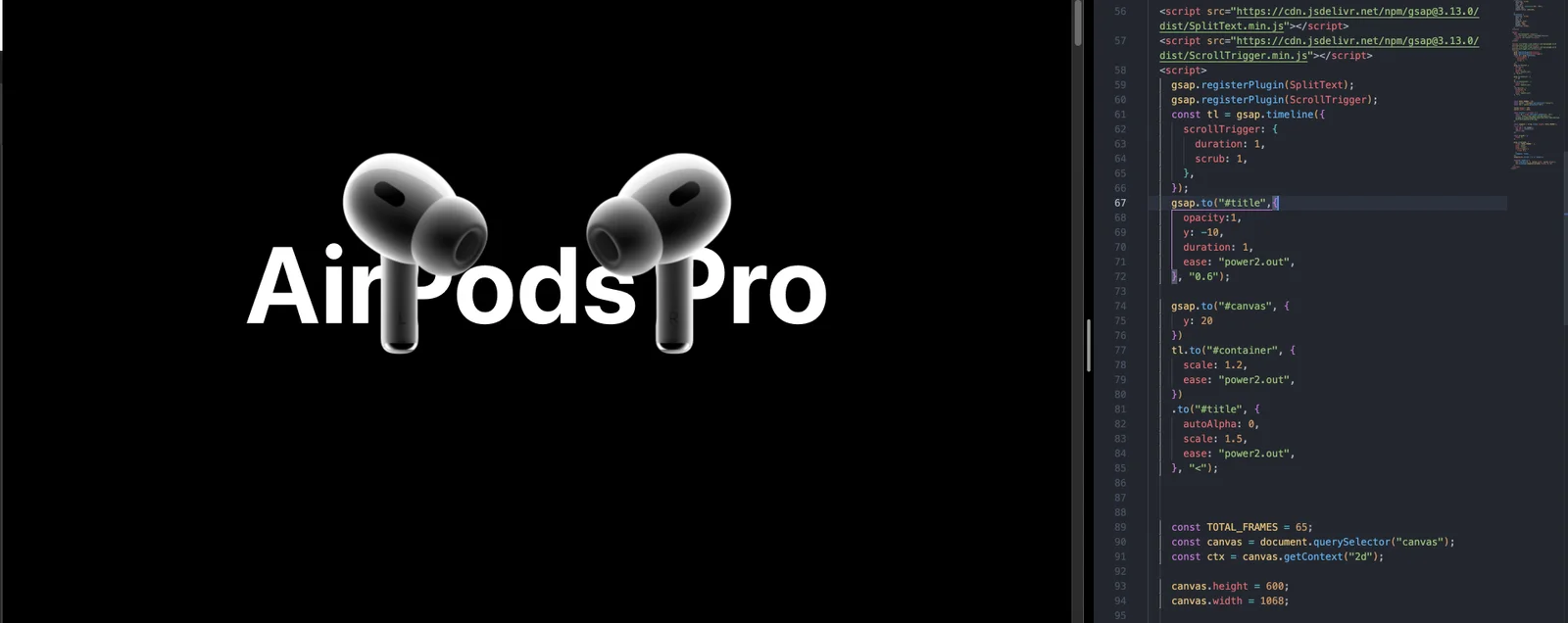
Project Overview
I built this demo to explore how GSAP + ScrollTrigger can turn scrolling into a rich, interactive animation surface. The page animates a headline (h1) by fading it in and then out as the user scrolls, while a <canvas> element plays a frame‑by‑frame image sequence that syncs perfectly with the scroll position. The result feels like a mini‑movie that the visitor controls with their own scrolling motion.
Stack & decisions
- GSAP (GreenSock Animation Platform) – Chosen for its performant timeline API and built‑in support for complex easing.
- ScrollTrigger plugin – Provides a declarative way to bind animation progress to the scroll bar, eliminating manual scroll listeners.
- Canvas rendering – Using a canvas to draw the image sequence keeps the animation lightweight compared with embedding a video.
Key mechanisms
- Timeline with
scrub– I created a GSAP timeline that includes the headline fade‑in/out and the canvas frame updates, and setscrub: trueon the ScrollTrigger. This makes the animation scrub forward and backward smoothly as the user scrolls up or down. - Frame‑by‑frame image sequence – The canvas draws images from an array based on the current scroll progress, giving the illusion of a fluid motion picture without the overhead of a video file.
- Responsive trigger bounds – ScrollTrigger’s start/end markers are defined relative to viewport percentages, ensuring the animation scales correctly on different screen sizes.
Este proyecto es una demostración del uso de GSAP y ScrollTrigger para crear animaciones avanzadas basadas en el scroll. El objetivo principal fue animar la opacidad y escala de un título (h1) y renderizar una secuencia de imágenes sincronizadas con el desplazamiento de la página.
¿Qué aprendí?
- GSAP y ScrollTrigger: Aprendí a utilizar la librería GSAP junto con su plugin ScrollTrigger para vincular animaciones a la posición del scroll, logrando efectos visuales modernos y fluidos.
- Importancia del Scroll: El scroll permite que las animaciones sean interactivas y respondan al usuario, haciendo la experiencia mucho más atractiva.
- Línea del tiempo (Timeline): Usar timelines en GSAP ayuda a coordinar múltiples animaciones y a mantener el control sobre la secuencia de efectos.
- El parámetro
scrub: Descubrí que el parámetroscrubes fundamental para que la animación reaccione de forma suave tanto al avanzar como al retroceder el scroll. Sinscrub, la animación solo se dispara una vez y no responde igual al volver atrás, perdiendo la sincronización con el desplazamiento.
Cómo funciona
- El título principal aparece con un efecto de fade-in y luego desaparece al hacer scroll, gracias a GSAP y ScrollTrigger.
- Un canvas renderiza una secuencia de imágenes que simulan una animación fluida, también controlada por el scroll.
Capturas de pantalla
_Agrega aquí tus propias capturas de pantalla
## Keep exploring
An animation inspired by the Fortnite x The Simpsons collaboration.
A Twitch clone built to practice React, Astro, and real API integrations.